Waste Service
About the Project
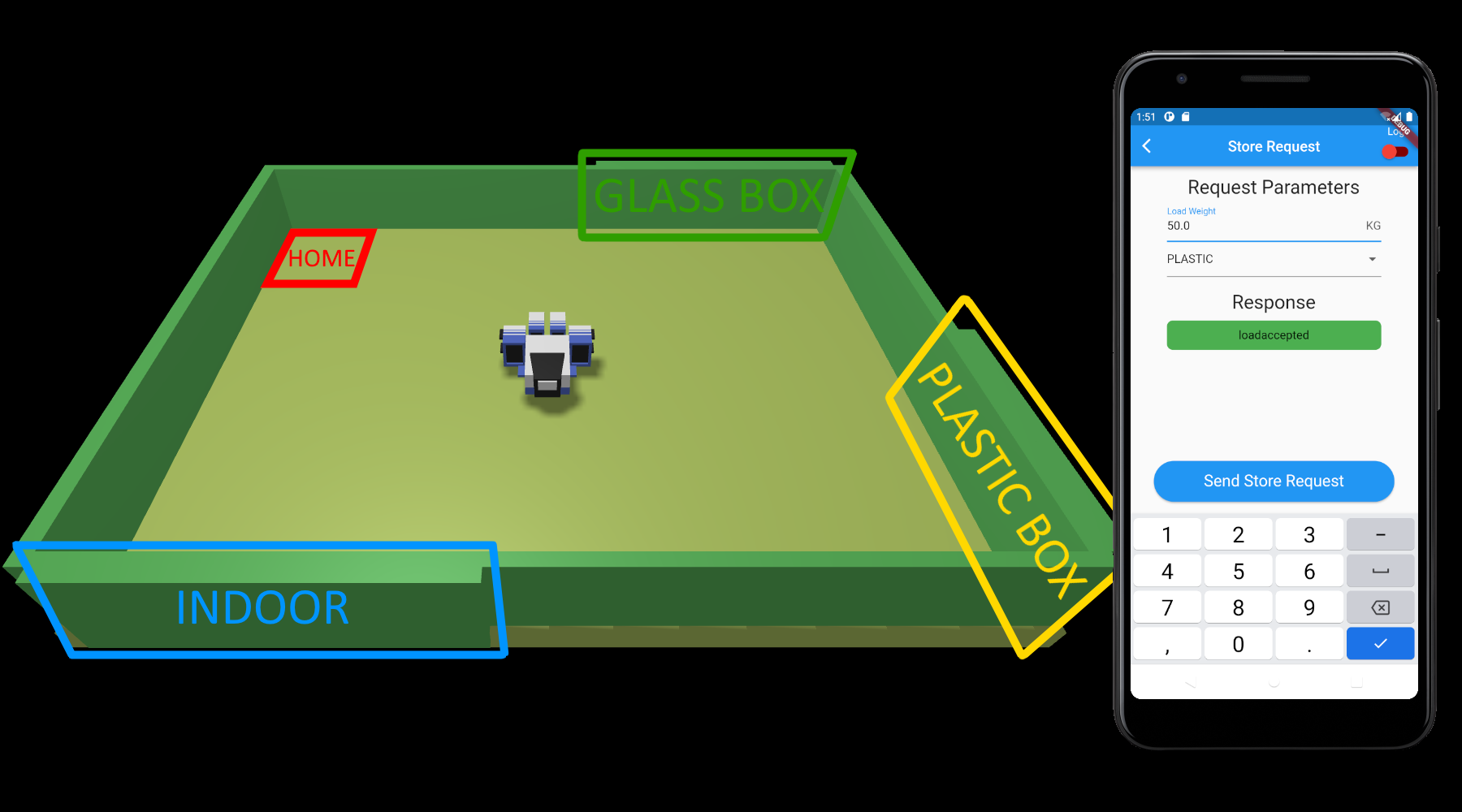
WasteService is a distributed software system implementing a differentiated waste disposal service. It’s made of several application components, designed to run on nodes with heterogeneous architectures: a mobile device, a Raspberry Pi and headless nodes.
I developed it with my university colleagues TryKatChup and Raffaele Battipaglia for the Software Systems Engineering M course at Alma Mater Studiorum, University of Bologna, following the SCRUM agile framework.
The Goal
The point of the course was to simulate the commission of a software system to an agile SCRUM team. The customer was the professor himself, Antonio Natali, who handed us a requirements document and a set of supporting tools to integrate into the project — and who played the customer role for real, sprint review after sprint review.
Requirements
The requirements can be summarized as follows:
- the service area must include:
- an Indoor port, where the waste material is delivered;
- two containers, PlasticBox and GlassBox, storing up to a maximum amount of material each;
- a Home location;
- a DDR robot working as a transport trolley, initially at Home, which performs a deposit action in three phases: picking up the waste-load from a waste truck at Indoor, moving to the proper container, and depositing the load into it;
- a WasteServiceStatusGUI that lets a human service manager supervise the state of the service area: the state and the position of the transport trolley, the weight stored in the two containers and the state of the Led;
- a Sonar and a Led connected to a Raspberry Pi. The Led is off when the trolley is at Home, blinks while it’s moving and is on when it’s stopped; the sonar works as an alarm device, stopping the trolley when it measures a distance below a given threshold, and resuming it when the distance goes back above it.
QAK, the Modelling Language
The whole system is modelled in QAK (QActor metamodel), the language designed by the professor: a modelling language for distributed applications, inspired by the Akka actor model, whose “k” stands for Kotlin, since that’s what it compiles down to — with no Akka involved.
The concepts are few and they map nicely onto a system like this one:
- a QActor is an active entity behaving like a finite state machine;
- every actor lives in a Context, that is a computational node, declared with its host and port;
- actors interact through messages (
Dispatchone-way,Request/Replypairs) and events, addressing each other by name rather than by low-level references. Across nodes, the runtime carries them over TCP, CoAP or MQTT.
Which means the interface of the system is a plain text file listing what everyone can say to everyone else:
// SmartDevice (truck) -> WasteService
Request storerequest:	storerequest(TYPE, LOAD)
// WasteService -> SmartDevice
Reply loadaccepted:		loadaccepted(_)
Reply loadrejected:		loadrejected(_)

// WasteService -> TransportTrolley
Request deposit:			deposit(TYPE, LOAD)
// TransportTrolley -> WasteService
Reply pickupcompleted:		pickupcompleted(_)
Dispatch depositcompleted:	depositcompleted(_)
Dispatch depositfailed:		depositfailed(REASON)

// Sonar -> AlarmController
Dispatch sonar_data:	sonar_data(DISTANCE)
// AlarmController -> PathExecutorBCR
Event stop:		stop(_)
Event resume:	resume(_)

// CONTEXES ===================================================================
Context ctx_wasteservice		ip [host="localhost" port=11800]
Context ctx_transporttrolley	ip [host="localhost" port=11801]
Context ctx_robot				ip [host="localhost" port=8020]
Context ctx_raspberrypi			ip [host="192.168.1.5" port=11802]
Note the last one: the Raspberry Pi is just another context, sitting at another IP. Moving the alarm subsystem onto real hardware meant changing an address, not rewriting the interaction.
Architecture
From the model, the toolchain generates both the Kotlin skeletons and the architecture diagram — which makes the picture below an actual artifact of the project, not a drawing made afterwards to look organized:
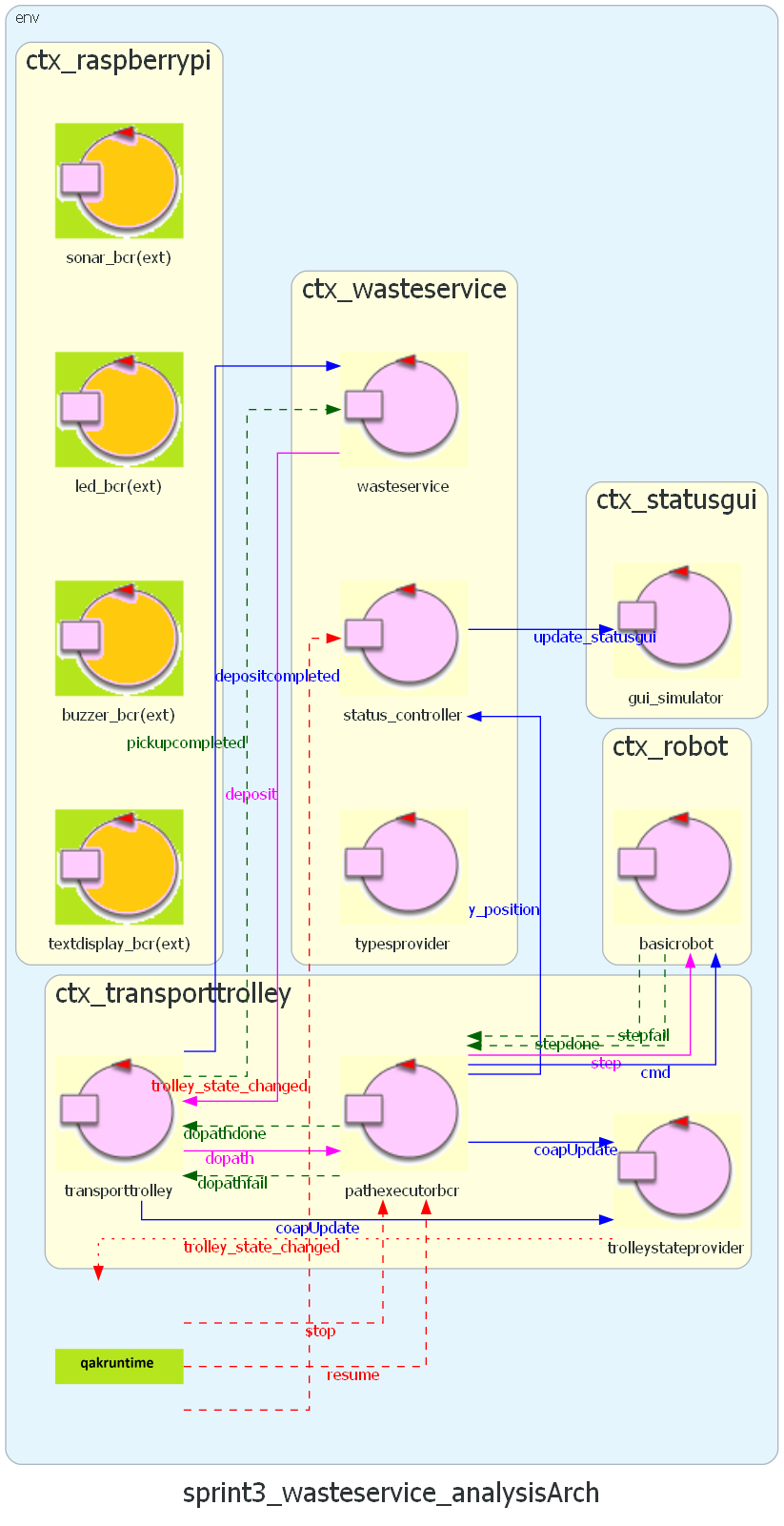
System architecture: contexts, actors and messages
The responsibilities are split like this:
ctx_wasteservicehostswasteservice, the actor that accepts or rejects the store requests depending on the free space in the requested container,typesprovider, which tells the smart devices which waste types are accepted, andstatus_controller, which keeps the GUI updated;ctx_transporttrolleyhoststransporttrolley, which performs the deposit,pathexecutorbcr, which turns a path into robot moves and can be stopped and resumed mid-path, andtrolleystateprovider, which publishes the trolley state;ctx_raspberrypihosts the actors wrapping the physical devices — sonar, led, buzzer and display;ctx_robothostsbasicrobot, the actor provided by the customer that drives the robot.
Components
Smart Device — a Flutter mobile app used by the waste truck driver to send a StoreRequest, specifying the amount and the type of waste to deposit. It’s the entry point of the whole flow.
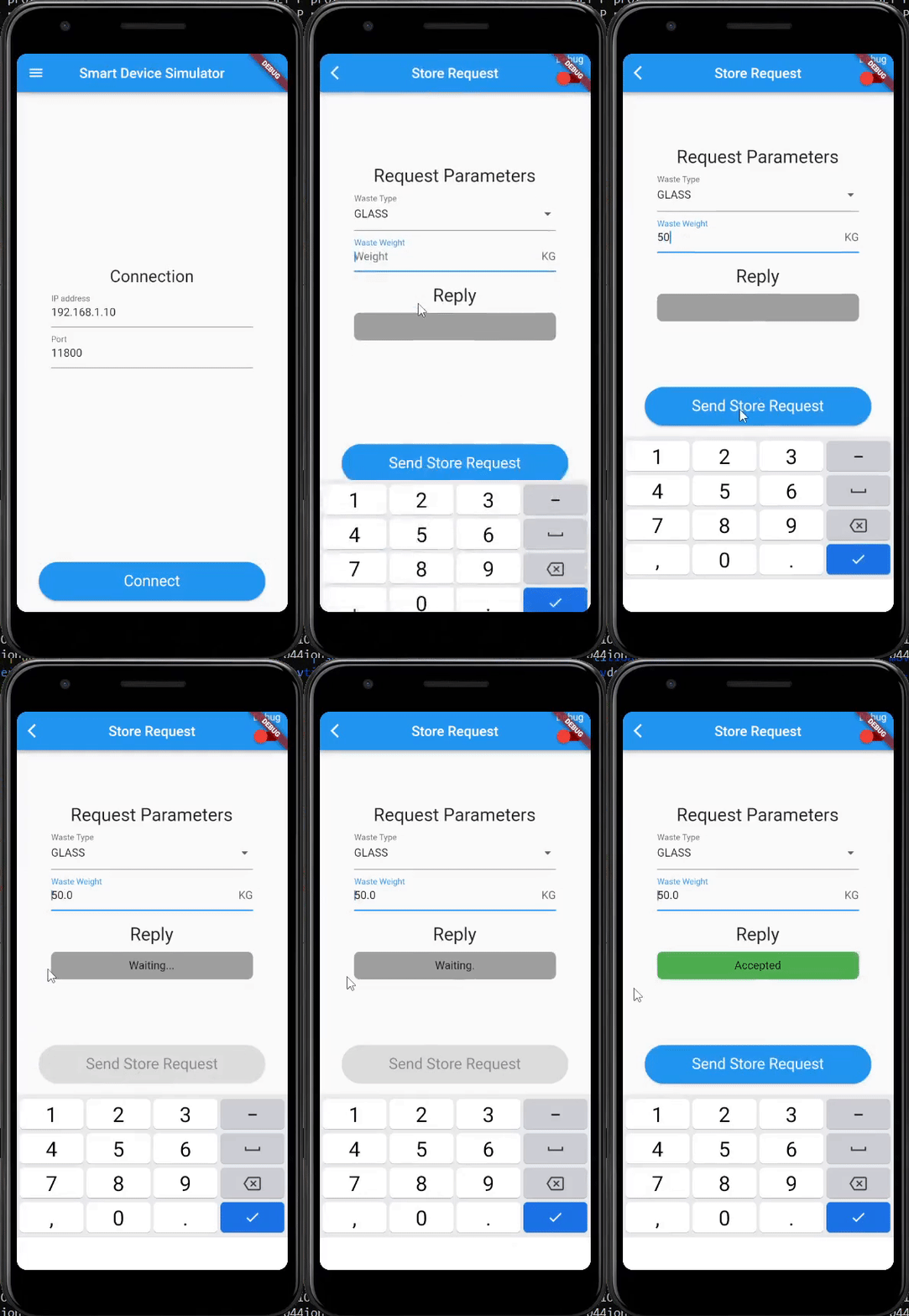
Sending a store request from the Smart Device
Virtual Robot — a web application provided by the customer, simulating the robot inside a rectangular room and accepting movement commands over HTTP and WebSocket. It’s what lets you develop the whole system without the physical robot on your desk.
Mapper QAK22 — another tool from the customer: it walks the robot through the room step by step and produces a grid representation of it.
Map Editor — a desktop application we wrote in Java, which loads that grid and lets you drag and drop the zones (Home, Indoor, PlasticBox, GlassBox) to produce the map configuration the service loads at startup. Without it, configuring the area meant editing coordinates by hand.
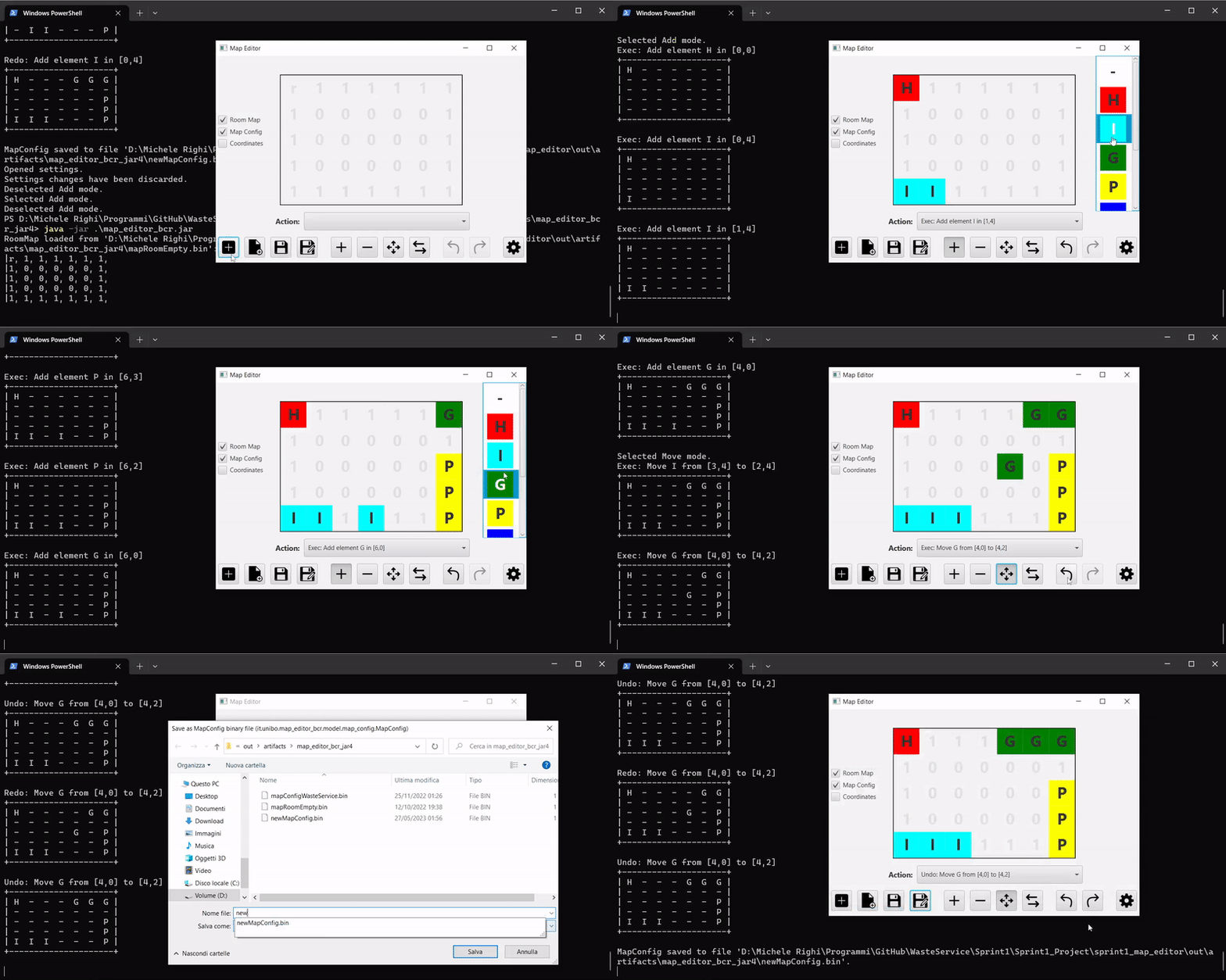
Placing the zones with the Map Editor
Waste Service Core — the heart of the system: it loads a map configuration, receives the store requests, decides whether they fit, and delegates the pick-up and the deposit to the transport trolley.
Waste Service RPi — the alarm and signalling subsystem. It runs on a Raspberry Pi, with the sonar, led, buzzer and LCD display driven by small Python scripts wrapped by Kotlin actors, and can also run in simulated mode on a desktop node when the hardware isn’t around.
Waste Service GUI — a Spring Boot web application that monitors the service: it receives updates over a STOMP WebSocket and renders the waste area, the trolley position and the containers’ load.
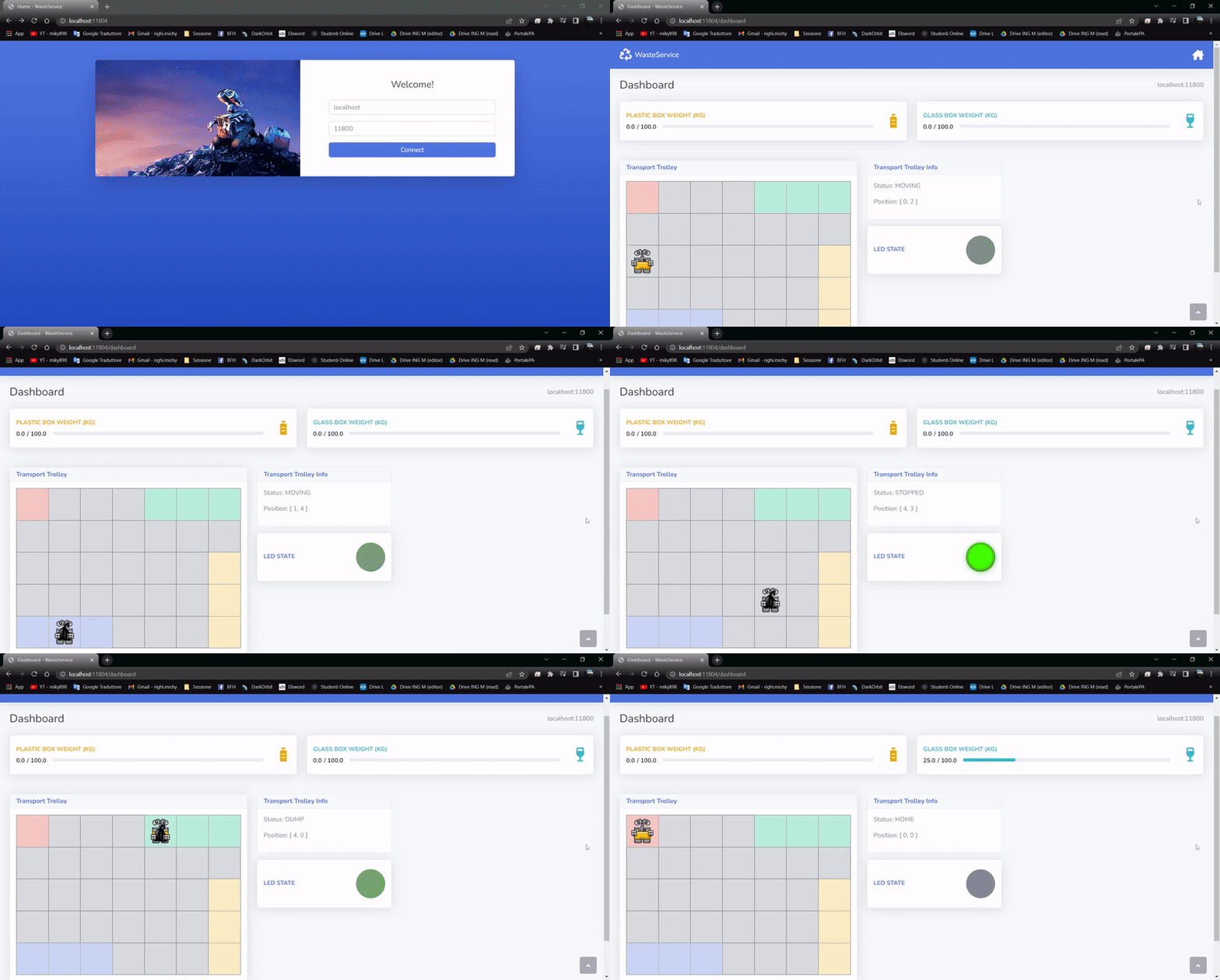
The monitoring dashboard
The Sprints
The project was delivered in four sprints, each closed by a review with the customer:
| Sprint | Goal | Review |
|---|---|---|
| Sprint 0 | requirements formalization, system overview and model | 08/09/22 |
| Sprint 1 | WasteService core business (requirements 1 and 2) | 25/11/22 |
| Sprint 2 | Raspberry Pi: sonar, led and alarm (requirement 4) | 14/04/23 |
| Sprint 3 | monitoring: the status GUI (requirement 3) | 27/04/23 |
Every sprint follows the same path in the repository: a problem analysis (the QAK model of the problem, with its tests) and then a project (the actual implementation), each with its own documentation page.
The part I found most valuable was the format: the requirements were deliberately incomplete, and the way to fill the gaps was to ask the customer during the reviews, exactly as it happens on a real project. Writing the model before the code — and having the model generate the code skeletons and the diagrams — meant those conversations were about behaviour, not about implementation details.
Running It
The deployment folder ships the pieces ready to start: the SmartDevice.apk, the compiled contexts and a batch script that launches the whole system, one context per process:
cd ./VirtualRobot/
start run_VirtualRobot.bat

cd ../WasteService_Core/
start run_Ctx_Robot.bat
start run_Ctx_TransportTrolley.bat
start run_Ctx_WasteService.bat

cd ../WasteService_RPi/
start run_WasteService_RPi.bat

cd ../WasteService_GUI/
start run_WasteService_GUI.bat
The core and the GUI also come with Dockerfiles, so they can be run as containers instead.
Demo
The full run — request, pick up, deposit, alarm and monitoring — is in the demo video:
Team Members
 |  |  |
| Raffaele Battipaglia | Karina Chichifoi | Michele Righi |
system software engineering alma mater studiorum unibo java kotlin python c bash dart flutter javafx spring html css javascript raspberry pi actors scrum
1226 Words
2022-04-27 09:00